Learning Claude Skills: A Roadmap to Extending Claude Code
Claude Code has evolved beyond a simple coding assistant into an extensible platform. With Claude Skills, developers can create custom capabilities that extend what Claude Code can do — from automating repetitive workflows to integrating with external tools and sharing reusable skill packages across teams.
This post maps out the learning journey for mastering Claude Skills across three key branches: Skill Authoring, Tool Integration, and Distribution.
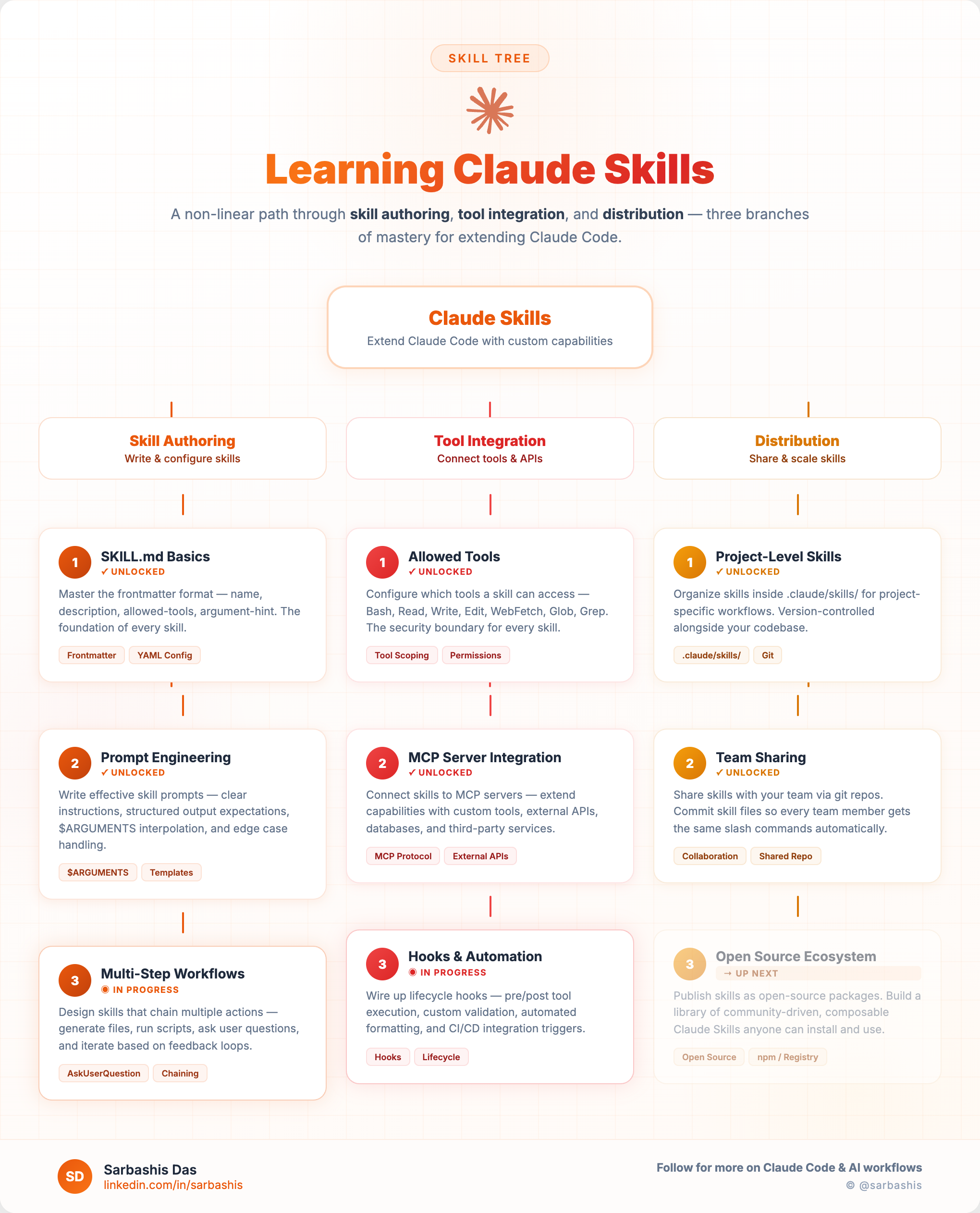
Skill Authoring
Skill authoring is the foundation — learning how to write, structure, and refine custom skills that Claude Code can execute on demand.
SKILL.md Basics
Every skill starts with a SKILL.md file. This markdown file defines the skill’s name, description, and the prompt instructions that Claude follows when the skill is invoked. Understanding the structure of SKILL.md is the entry point for anyone looking to build custom skills.
Key concepts:
- Skill metadata — name, description, and trigger command
- Prompt body — the instructions Claude follows when the skill is activated
- Allowed tools — specifying which tools (Bash, Read, Write, etc.) the skill can use
Prompt Engineering for Skills
Once you understand the basics, the next step is crafting effective prompts that produce reliable, consistent results. Writing skill prompts is different from conversational prompting — you need to be precise about the expected inputs, outputs, and edge cases.
Techniques that matter:
- Structured output formats — guiding Claude to produce consistent output
- Context injection — providing the right context from the codebase
- Guard rails — constraining behavior to prevent unintended side effects
Multi-Step Workflows
The most powerful skills orchestrate multiple steps — reading files, analyzing content, making decisions, and writing output. Multi-step workflows turn Claude Skills into genuine automation pipelines.
Examples include:
- Code review workflows that read diffs, check for patterns, and generate reports — see Trail of Bits security review skills and the requesting-code-review skill from Superpowers
- Refactoring skills that analyze usage patterns before making changes — see the TDD skill with its RED-GREEN-REFACTOR cycle and the Move Code Quality skill for systematic refactoring analysis
- Documentation generators that read code structure and produce formatted docs — see the code-documenter skill and the changelog-generator skill
Tool Integration
Skills become truly powerful when they integrate with external tools and systems. This branch covers connecting Claude Skills to the broader development ecosystem.
Allowed Tools Configuration
Each skill declares which tools it can access. Understanding the tool permission model is essential for building skills that are both capable and safe. The allowedTools field in skill metadata controls what actions a skill can take.
MCP Server Integration
The Model Context Protocol (MCP) provides a standardized way to connect Claude to external data sources and services. Skills can leverage MCP servers to access databases, APIs, file systems, and more — all through a consistent interface.
Integration patterns:
- Connecting to project-specific MCP servers for domain data
- Chaining MCP tool calls within skill workflows
- Using MCP resources for dynamic context injection
Hooks and Automation
Hooks allow skills to trigger automatically in response to events — like file saves, git commits, or tool invocations. Combined with skills, hooks enable fully automated workflows that run without manual invocation.
Use cases:
- Pre-commit hooks that run linting skills automatically
- File-watch hooks that trigger documentation updates
- Post-build hooks that run validation skills
Distribution
Building great skills is only half the story. The distribution branch covers how to package, share, and discover skills across teams and the broader community.
Project-Level Skills
The simplest distribution model — skills live in the project repository (typically in a .claude/skills/ directory) and are available to anyone working on that project. This is the natural starting point for team-specific workflows.
Team Sharing
Beyond individual projects, skills can be shared across an organization. This involves establishing conventions for skill packaging, versioning, and documentation so that teams can discover and adopt each other’s skills.
Open Source Ecosystem
The broader Claude Skills ecosystem is growing. Open source skill repositories allow the community to share, discover, and build on each other’s work — much like npm packages or VS Code extensions.
Popular Open Source Skill Repositories
| Repository | Stars | Focus |
|---|---|---|
| obra/superpowers | 73.5k | Agentic skills framework with code review, TDD, and development methodology |
| affaan-m/everything-claude-code | 65.8k | 65+ skills including code review, refactoring, security audit, and documentation |
| ComposioHQ/awesome-claude-skills | 41.8k | Curated list of skills with changelog generator, TDD, and architecture skills |
| anthropics/anthropic-cookbook | 34.4k | Official cookbook with skills for document processing and custom skill development |
| hesreallyhim/awesome-claude-code | 26.8k | Curated list of skills, hooks, slash-commands, and agent orchestrators |
Star counts as of March 2026
Getting Started
If you’re new to Claude Skills, here’s a practical path:
- Start with
SKILL.md— Create a simple skill that automates something you do frequently - Iterate on the prompt — Refine the instructions until the output is reliable
- Add tool integrations — Connect to MCP servers or external tools as needed
- Share with your team — Put the skill in your project repo and document it
- Contribute to the ecosystem — Package and publish skills that could help others
Claude Skills represent a shift from using AI as a tool to building on top of AI as a platform. The learning curve is gentle, and the payoff — in terms of productivity and automation — is substantial.