Demystifying Agent Deployment Strategies: Local vs Remote Agents
The AI agent ecosystem has matured rapidly. What started as simple chatbot wrappers has evolved into sophisticated systems capable of autonomous reasoning, tool use, and multi-step task execution. But as organizations move from prototype to production, a critical architectural question emerges: where should your agent run?
The answer is not one-size-fits-all. The choice between a local agent — one that runs on a developer’s machine and interacts directly with the local environment — and a remote agent — one deployed as a service, often built with agentic frameworks — depends on your use case, security posture, collaboration needs, and operational constraints.
This post breaks down the deployment landscape, compares the two paradigms, and maps concrete use cases to the right strategy.
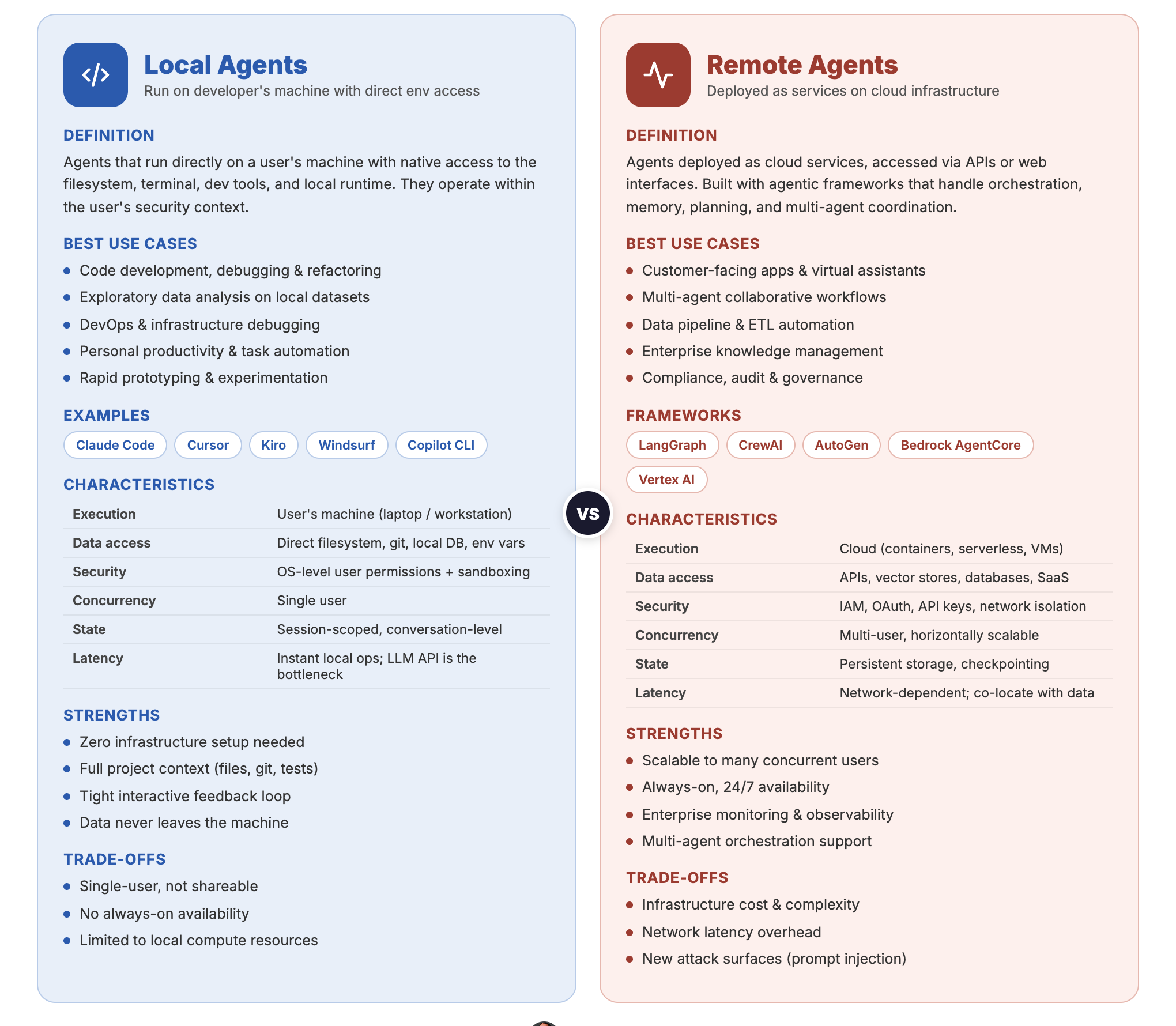 Local Agents vs Remote Agents — side-by-side comparison
What Are Local Agents?
Local agents run directly on a user’s machine. They have native access to the filesystem, terminal, development tools, and local runtime environments. They operate within the user’s security context — whatever the user can do, the agent can do.
Examples:
- Claude Code — Anthropic’s CLI agent that reads, writes, and executes code directly in your terminal
- GitHub Copilot (CLI/Editor) — code completion and chat integrated into IDEs
- Kiro — AWS’s AI-powered IDE with spec-driven development and built-in agent capabilities
- Cursor / Windsurf — AI-native code editors with built-in agent capabilities
Characteristics of Local Agents
| Aspect | Detail |
|---|---|
| Execution environment | User’s machine (laptop, workstation) |
| Data access | Direct filesystem, git repos, local databases, environment variables |
| Latency | Low for local operations; API calls to LLM providers add network latency |
| Security boundary | Runs with the user’s OS-level permissions |
| State management | Conversation and workspace state managed locally |
| Collaboration | Single-user by default; sharing requires explicit mechanisms |
What Are Remote Agents?
Remote agents are deployed as services — typically on cloud infrastructure — and accessed via APIs, web interfaces, or orchestration layers. They are built using agentic frameworks that handle tool orchestration, memory, planning, and multi-agent coordination.
Examples of Frameworks:
- LangGraph — stateful, graph-based agent orchestration from LangChain
- CrewAI — role-based multi-agent framework for collaborative task execution
- Microsoft Agent Framework — Microsoft’s enterprise-ready framework for multi-agent orchestration
- Amazon Bedrock AgentCore — managed agent service with built-in tool use and knowledge bases
- Google Vertex AI Agent Builder — end-to-end agent development and deployment on GCP
- OpenAI Agents SDK — OpenAI’s framework for building and deploying production agents
Characteristics of Remote Agents
| Aspect | Detail |
|---|---|
| Execution environment | Cloud infrastructure (containers, serverless, VMs) |
| Data access | Via APIs, databases, vector stores, and configured integrations |
| Latency | Network-dependent; optimized with caching and streaming |
| Security boundary | Service-level IAM, API keys, OAuth — isolated from user machines |
| State management | Persistent storage, session databases, checkpointing |
| Collaboration | Multi-user by design; shared access through APIs |
When to Use Local Agents
Local agents excel when the task is developer-centric, interactive, and tightly coupled to the local environment.
1. Code Development and Refactoring
Local agents like Claude Code shine when you need an AI that understands your full project context — your file structure, dependencies, test suites, and build system. The agent can read your code, make edits, run tests, and iterate in a tight feedback loop without ever leaving your terminal.
Why local wins: The agent needs direct filesystem access, git integration, and the ability to execute build/test commands. Sending your entire codebase to a remote service adds latency, security concerns, and context limitations.
2. Exploratory Data Analysis
Data scientists working with local datasets, Jupyter notebooks, or database connections benefit from local agents that can inspect data files, run scripts, and produce visualizations — all within the existing development environment.
Why local wins: Data stays on the machine. No need to upload sensitive datasets to external services. The agent can directly execute pandas, SQL, or R code against local data.
3. DevOps and Infrastructure Debugging
When a build is failing, a container won’t start, or logs need parsing, a local agent with shell access can investigate the problem in real time — reading logs, inspecting Docker state, checking environment variables, and running diagnostic commands.
Why local wins: Debugging is inherently interactive and requires access to the local runtime state. Remote agents would need complex tunneling or SSH access to be equally effective.
4. Personal Productivity and Automation
Automating repetitive local tasks — file organization, git workflows, boilerplate generation, configuration management — is a natural fit for local agents. They can be extended with hooks and skills to trigger automatically based on events.
Why local wins: These tasks are personal, low-stakes, and benefit from instant execution without network overhead.
5. Prototyping and Experimentation
When you are exploring a new library, spiking on an architectural idea, or building a proof-of-concept, a local agent provides the fastest iteration cycle. You describe what you want, the agent builds it, you test it — all in seconds.
Why local wins: Speed of iteration. No deployment pipeline, no API configuration, no infrastructure setup.
When to Use Remote Agents
Remote agents are the right choice when the workload requires scalability, multi-user access, persistent state, or integration with enterprise systems.
1. Customer-Facing Applications
Chatbots, virtual assistants, support agents, and conversational interfaces that serve end users must run as remote services. They need to handle concurrent requests, maintain session state, integrate with CRM/ticketing systems, and operate 24/7.
Why remote wins: You cannot run a customer-facing agent on a developer’s laptop. It needs to be a deployed, scalable service with monitoring, logging, and SLA guarantees.
2. Multi-Agent Workflows
Complex tasks that benefit from decomposition — where specialized agents collaborate (a researcher, a writer, a reviewer, a fact-checker) — require orchestration infrastructure. Frameworks like CrewAI, LangGraph, and Microsoft Agent Framework provide the coordination layer.
Why remote wins: Multi-agent systems need shared state, message passing, and orchestration logic that goes beyond what a single local process can manage.
3. Data Pipeline and ETL Automation
Agents that process incoming data, transform it, validate quality, and load it into warehouses need to run on schedules or in response to events. They integrate with cloud storage, databases, and monitoring systems.
Why remote wins: Pipeline agents must run continuously or on triggers, independent of any user’s machine. They need access to cloud-native data infrastructure.
4. Enterprise Knowledge Management
Agents that sit on top of organizational knowledge bases — answering questions from internal documents, synthesizing information across systems, or routing queries to the right teams — require persistent deployment with access to vector databases, document stores, and enterprise APIs.
Why remote wins: The knowledge base is shared across the organization. The agent must be accessible to multiple users simultaneously and maintain consistent, up-to-date indexes.
5. Compliance, Audit, and Governance Workflows
Agents that review documents for compliance, flag risks, or generate audit reports need to operate within controlled environments with logging, access controls, and audit trails — requirements best met by cloud-deployed services.
Why remote wins: Regulatory requirements demand centralized logging, reproducibility, and access controls that are easier to enforce in a managed deployment.
Decision Framework
The following flowchart helps you choose the right deployment strategy based on your requirements. Start from the top and follow the branches.
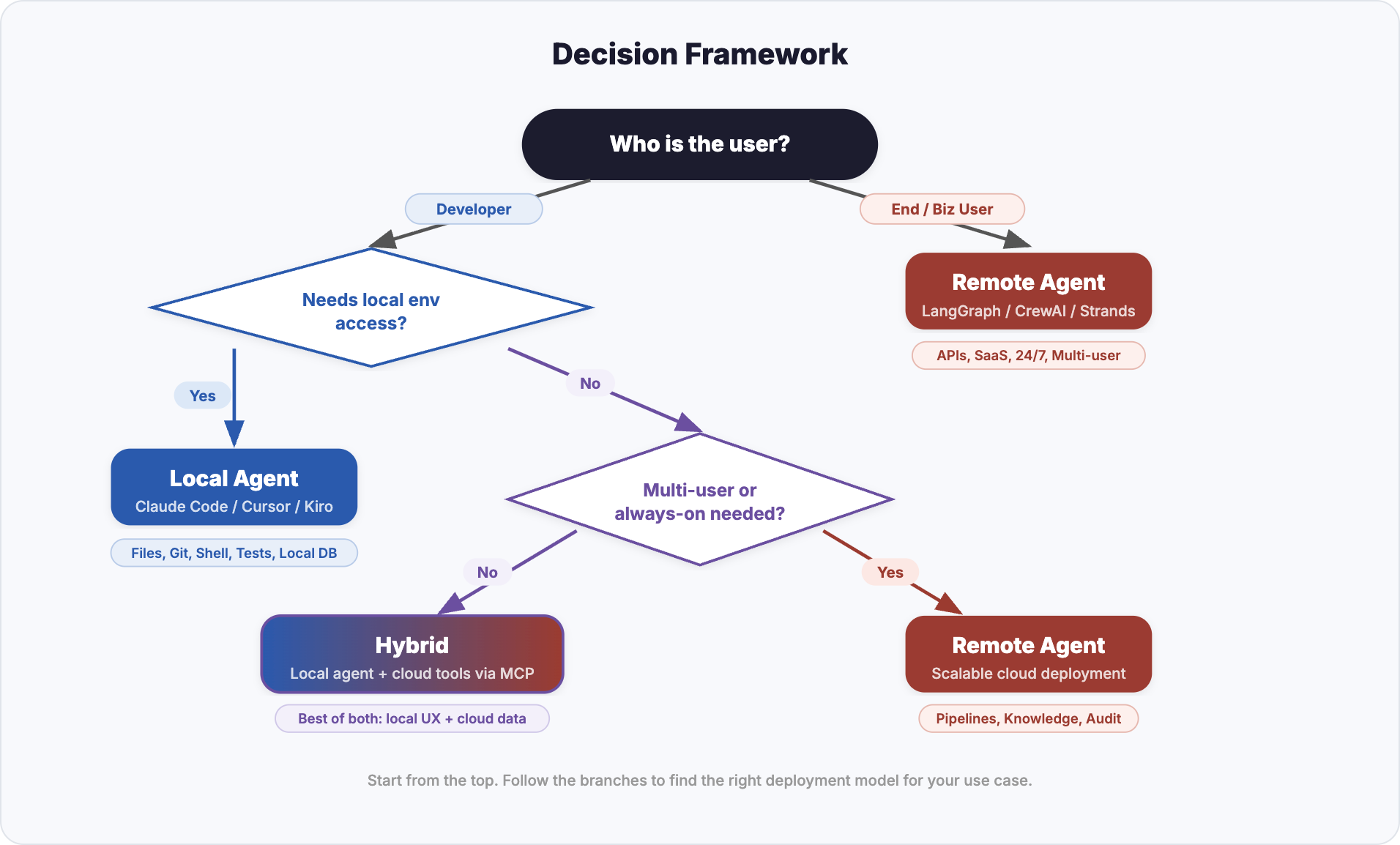 Start from “Who is the user?” and follow the branches to find the right deployment model
Key Decision Factors
| Factor | Favors Local | Favors Remote |
|---|---|---|
| User type | Developer, data scientist | End user, business user, customer |
| Environment access | Needs filesystem, shell, local tools | Needs cloud APIs, databases, SaaS |
| Concurrency | Single user | Multiple concurrent users |
| State persistence | Session-scoped is sufficient | Long-lived state across sessions |
| Data sensitivity | Data should not leave the machine | Data is already in the cloud |
| Iteration speed | Fast local loop needed | Async/batch processing acceptable |
| Multi-agent orchestration | Not required | Required |
| Availability | On-demand (user triggers) | Always-on (24/7 service) |
Hybrid Patterns
In practice, the most effective architectures often combine both approaches.
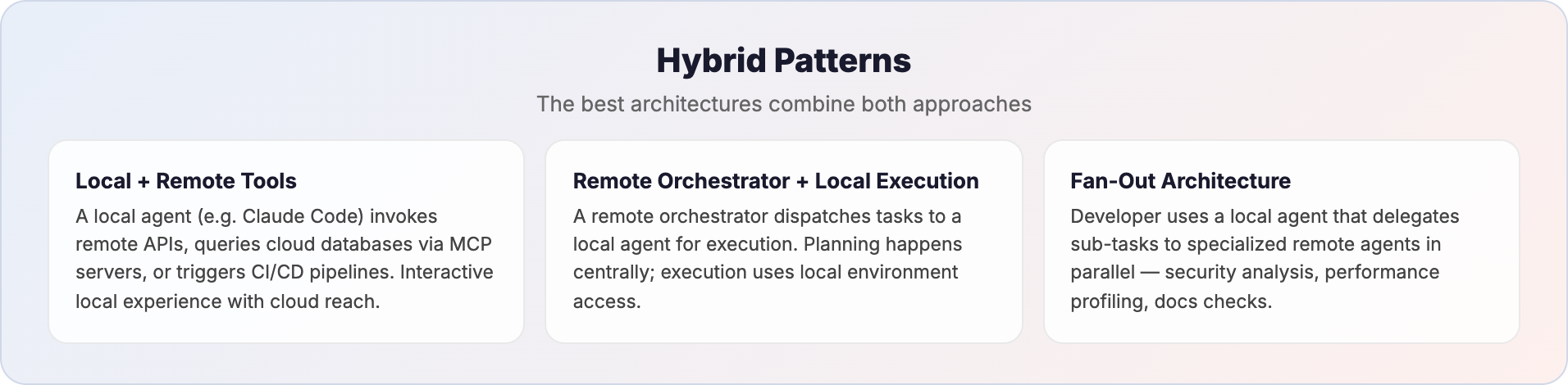 Three hybrid patterns that combine local and remote agents
Local Agent with Remote Tool Access
A local agent like Claude Code can invoke remote APIs, query cloud databases via MCP (Model Context Protocol) servers, or trigger CI/CD pipelines — combining the interactive local experience with access to remote infrastructure. The agent runs locally but its tools reach into the cloud.
MCP is an open standard that provides a universal interface between AI agents and external tools or data sources. Instead of building custom integrations for every service, an agent connects to MCP servers that expose a standardized set of capabilities — reading from databases, calling APIs, accessing file systems, or interacting with SaaS platforms. This makes MCP a natural bridge layer in hybrid architectures: a local agent gains cloud reach without sacrificing its local execution model, and a remote agent can expose its capabilities as MCP tools that other agents consume.
Remote Orchestrator with Local Execution
In this pattern, a remote agent handles the high-level planning, task decomposition, and coordination while dispatching individual execution steps to a local agent that has direct access to the developer’s environment.
How it works:
- A remote orchestrator (e.g., a LangGraph or CrewAI workflow running in the cloud) receives a complex task — say, “migrate the authentication module from session-based to JWT”
- The orchestrator breaks the task into sub-steps: analyze current auth flow, identify all session references, generate JWT utility functions, update middleware, write tests
- Each sub-step is dispatched to a local agent (e.g., Claude Code running in the developer’s terminal) that executes it against the actual codebase — reading files, editing code, running tests
- The local agent reports results back to the orchestrator, which decides the next step based on outcomes (e.g., if tests fail, it routes to a debugging sub-task)
Why this pattern matters:
- Planning benefits from breadth — the remote orchestrator can consult knowledge bases, pull in best practices, or coordinate across multiple repositories without being limited to a single developer’s context window
- Execution benefits from locality — code changes, test runs, and build commands need direct filesystem and shell access that only a local agent provides efficiently
- Separation of concerns — the orchestration logic (what to do and in what order) is decoupled from the execution logic (how to do it in this specific environment), making both independently upgradable
Real-world example:
Consider a platform engineering team that maintains a remote “migration orchestrator” agent. When a developer needs to upgrade a microservice from one framework version to another, they trigger the orchestrator. It fetches the migration playbook from a central knowledge base, identifies the steps relevant to this specific service, and feeds them one-by-one to the developer’s local Claude Code instance. The local agent performs each code change, runs the test suite, and reports back. If something breaks, the orchestrator adjusts the plan — perhaps inserting an additional compatibility shim step it learned from a previous migration.
When to use this pattern:
- Standardized workflows that need to run consistently across many developers or repositories
- Tasks where the planning logic is complex enough to warrant its own agent but execution must happen locally
- Organizations that want centralized control over agent behavior (guardrails, approved patterns) while giving developers local execution speed
Fan-Out Architecture
A developer uses a local agent for interactive work, which in turn delegates sub-tasks to remote agents. For example, a local agent might coordinate a code review where specialized remote agents handle security analysis, performance profiling, and documentation checks in parallel.
Practical Considerations
Security
- Local agents inherit the user’s permissions — powerful but risky if the agent behaves unexpectedly. Sandboxing and permission prompts (as Claude Code implements) mitigate this.
- Remote agents can be locked down with fine-grained IAM policies, network controls, and API scoping. But they also create new attack surfaces (prompt injection, data exfiltration via tool use).
Cost
- Local agents primarily incur API costs for LLM calls. Compute is “free” (your machine).
- Remote agents add infrastructure costs — compute, storage, networking, monitoring. Managed services (Bedrock AgentCore, Vertex AI) simplify operations but at a premium.
Observability
- Local agents have limited built-in observability. Debugging often means reading conversation logs.
- Remote agents can integrate with enterprise monitoring stacks — tracing, metrics, alerting — essential for production workloads.
Latency
- Local agents execute filesystem and shell operations instantly. The bottleneck is LLM inference.
- Remote agents add network hops but can be co-located with data sources for faster access to cloud resources.
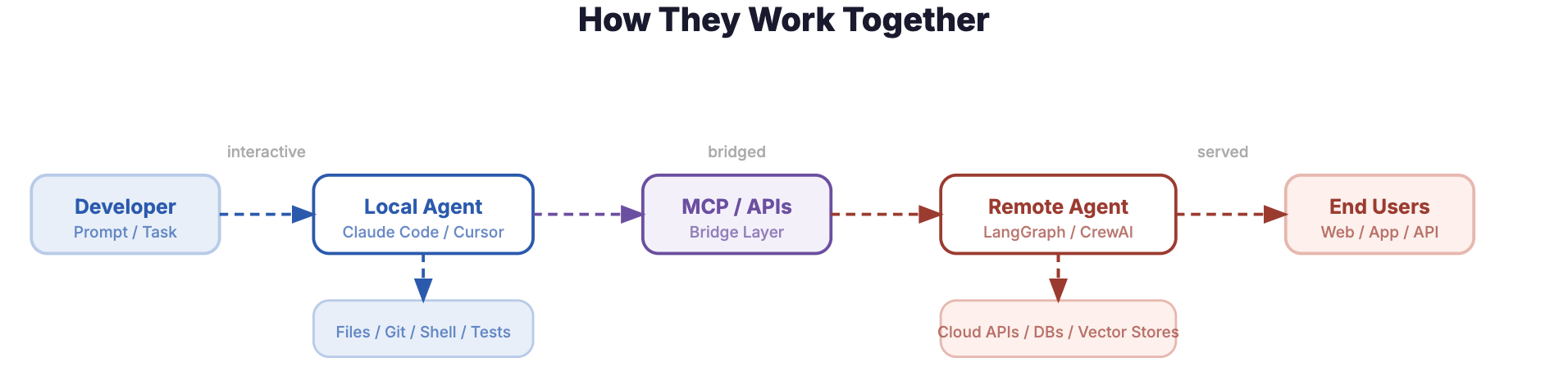 End-to-end flow: Developer to Local Agent to MCP/APIs to Remote Agent to End Users
Summary
| Deployment | Best For | Examples |
|---|---|---|
| Local Agent | Code development, debugging, prototyping, data exploration, personal automation | Claude Code, Kiro, Cursor |
| Remote Agent | Customer-facing apps, multi-agent workflows, pipelines, enterprise knowledge, compliance | LangGraph, CrewAI, Bedrock AgentCore, Vertex AI Agent Builder |
| Hybrid | Complex developer workflows, fan-out architectures, local agent + cloud tools | Local Claude Code with MCP servers + remote specialized agents |
The agent deployment decision is not about which approach is “better” — it is about matching the deployment model to the problem. Local agents give developers superpowers in their own environment. Remote agents bring AI capabilities to production systems and end users. The best architectures know when to use each — and increasingly, how to combine them.