Hooks in Claude Code and Kiro CLI: Deterministic Control for Agentic Coding
AI coding agents are probabilistic by nature. You ask Claude Code or Kiro CLI to “run the formatter after editing,” and most of the time it does — but “most of the time” is not a guarantee you can build a workflow on. Hooks close that gap. They are the deterministic layer beneath the model: user-defined commands that fire at fixed points in the agent’s lifecycle, whether the model remembers to ask for them or not.
Both Claude Code (Anthropic) and Kiro CLI (AWS’s terminal agent, formerly the Amazon Q Developer CLI / q chat) ship a hooks system. They converge on almost the same lifecycle model and even the same exit-code protocol — but differ in where configuration lives and how output reaches the model. This post walks through both, with working examples, and a side-by-side comparison.
Scope note: this is about Kiro CLI — the command-line agent — not the Kiro IDE’s “Agent Hooks” panel, which is a separate, GUI-driven feature. The two share a brand but not a hooks implementation.
Why hooks exist: deterministic control
The core idea, stated almost identically in both products’ docs, is deterministic control. Instead of relying on the LLM to choose to run an action, a hook guarantees it. Claude Code’s documentation frames hooks as a way to ensure “certain actions always happen rather than relying on the LLM to choose to run them.” Kiro CLI’s design is the same: a shell command wired to a lifecycle event runs every time, deterministically.
That single property unlocks three categories of use:
- Guardrails — block a tool call before it runs (e.g. veto
rm -rfor writes outside the repo). - Automation — format code, run tests, send a notification when the agent finishes.
- Context injection — feed fresh information (git status, ticket details, coding standards) into the model at the start of a session or turn.
The shared lifecycle model
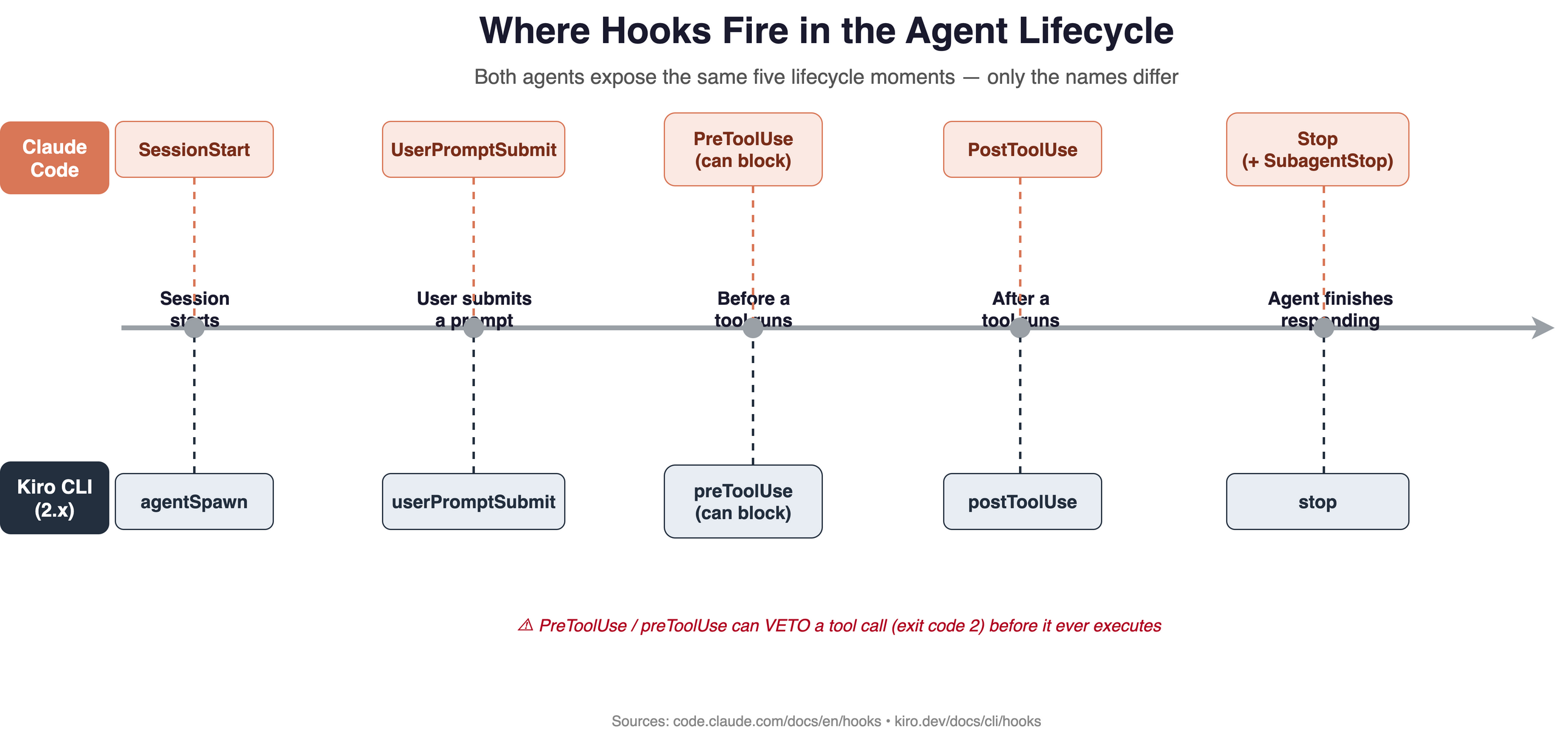
Both agents expose hooks at the same five moments in their loop. Only the names differ.
The five lifecycle moments where hooks fire. Claude Code (top) and Kiro CLI 2.x (bottom) expose the same points under different names.
| Lifecycle moment | Claude Code | Kiro CLI (2.x) |
|---|---|---|
| Session starts | SessionStart | agentSpawn |
| User submits a prompt | UserPromptSubmit | userPromptSubmit |
| Before a tool runs (can block) | PreToolUse | preToolUse |
| After a tool runs | PostToolUse | postToolUse |
| Agent finishes responding | Stop (+ SubagentStop) | stop |
Claude Code’s full event set is far broader — 30 events in total, spanning the session, the conversation turn, individual tool calls, subagents, tasks, MCP elicitations, worktrees, and context compaction. The docs group them into three cadences: once per session, once per turn, and once per tool call. Kiro CLI 2.x keeps the set tighter at the five above.
The full Claude Code event catalogue, and crucially which ones can block:
| Event | When it fires | Can block? |
|---|---|---|
SessionStart | A session begins or resumes | No |
Setup | One-time prep in --init/-p (CI/script) mode | No |
UserPromptSubmit | You submit a prompt, before Claude processes it | ✅ blocks & erases the prompt |
UserPromptExpansion | A typed command expands into a prompt | ✅ blocks the expansion |
PreToolUse | Before a tool call executes | ✅ blocks the tool call |
PermissionRequest | A permission dialog appears | ✅ denies the permission |
PermissionDenied | A tool call is denied by the auto-mode classifier | No (can request a retry) |
PostToolUse | After a tool call succeeds | No |
PostToolUseFailure | After a tool call fails | No |
PostToolBatch | After a batch of parallel tool calls resolves | ✅ stops the loop before the next model call |
Notification | Claude Code sends a notification | No |
MessageDisplay | While assistant message text is displayed | No |
SubagentStart | A subagent is spawned | No |
SubagentStop | A subagent finishes | ✅ prevents the subagent from stopping |
TaskCreated | A task is created via TaskCreate | ✅ rolls back the creation |
TaskCompleted | A task is marked completed | ✅ prevents completion |
Stop | Claude finishes responding | ✅ continues the conversation |
StopFailure | The turn ends due to an API error | No |
TeammateIdle | An agent-team teammate is about to go idle | ✅ prevents going idle |
InstructionsLoaded | A CLAUDE.md / .claude/rules/*.md file loads | No |
ConfigChange | A config file changes mid-session | ✅ blocks the change |
CwdChanged | The working directory changes (e.g. cd) | No |
FileChanged | A watched file changes on disk | No |
WorktreeCreate | A worktree is being created | ✅ any non-zero exit aborts creation |
WorktreeRemove | A worktree is being removed | No |
PreCompact | Before context compaction | ✅ blocks compaction |
PostCompact | After context compaction completes | No |
Elicitation | An MCP server requests user input | ✅ denies the elicitation |
ElicitationResult | After a user answers an MCP elicitation | ✅ blocks the response |
SessionEnd | A session terminates | No |
Of the 30, roughly half can block their event (return exit 2 to veto), which is what makes them useful as guardrails rather than just observers. Kiro CLI’s five triggers map onto the most-used rows above.
The single most important event in both systems is the one that fires before a tool runs — PreToolUse / preToolUse — because it is the only one that can veto the action. More on that under security.
Claude Code hooks
Configuration
Claude Code hooks live in a hooks block inside a settings.json file (user, project, or local scope). The structure has three levels of nesting: the event name, a matcher group that filters when it fires, and one or more handlers.
{ "hooks": { "PostToolUse": [ { "matcher": "Edit|Write", "hooks": [ { "type": "command", "command": "jq -r '.tool_input.file_path' | xargs npx prettier --write" } ] } ] } } This is the canonical example from the docs: after any Edit or Write tool call, pull the edited file path out of the JSON event on stdin and run Prettier on it. The matcher accepts an exact string, a pipe-separated list (Edit|Write), or a JavaScript regular expression — and is optional (omit it and the hook always fires).
Claude Code offers five handler types, not just shell commands: command (shell), http (POST to an endpoint), mcp_tool (invoke an MCP tool), prompt (run a model prompt), and agent (delegate to a subagent — currently flagged experimental).
How a command hook talks back
Command hooks receive a JSON event on stdin and communicate results through exit codes:
- Exit
0— success. ForSessionStart,UserPromptSubmit, andUserPromptExpansion, stdout is added to the model’s context. - Exit
2— blocking error. ForPreToolUse, this blocks the tool call, and stderr is fed back to the model as feedback. - Any other code — non-blocking error; a notice is shown and execution continues.
Watch for per-event exceptions: SessionStart, Setup, Notification, and PostToolUse cannot be blocked by exit 2 (it just surfaces stderr to you), while WorktreeCreate aborts on any non-zero code.
Beyond raw exit codes, Claude Code can read structured JSON from stdout. The cleanest way to inject context is an additionalContext string, which Claude wraps in a system reminder rather than showing as a chat message:
#!/usr/bin/env bash # .claude/hooks/inject-git-status.sh (wired to SessionStart) status=$(git status --short 2>/dev/null) jq -n --arg ctx "Current git status:\n$status" \ '{hookSpecificOutput: {hookEventName: "SessionStart", additionalContext: $ctx}}' Kiro CLI hooks
Configuration (2.x)
In Kiro CLI 2.x, hooks live in a hooks field inside the agent config JSON, keyed by trigger type. Each hook has a required command and — for preToolUse/postToolUse — an optional matcher:
{ "hooks": { "agentSpawn": [ { "command": "git status --short" } ], "postToolUse": [ { "matcher": "fs_write", "command": "cargo fmt" } ] } } Here, git status runs and is injected into context when the agent spawns, and cargo fmt runs after any file write. The matcher is more expressive than Claude Code’s: it understands canonical tool names and aliases (fs_write or write, execute_bash or shell, use_aws or aws), MCP namespacing (@server for all of a server’s tools, or server/tool for one), a * wildcard, and builtin for built-in tools only.
Two extra knobs worth knowing: each hook has a configurable timeout_ms (default 30 seconds) and a cache_ttl_seconds to cache output (0 = no caching) — though agentSpawn hooks are never cached.
How output reaches the model
Kiro CLI uses the same stdin-JSON / exit-code protocol as Claude Code. The event on stdin carries hook_event_name, cwd, session_id, plus tool_name, tool_input, and (for postToolUse) tool_response. Exit codes behave identically: 0 adds stdout to context for agentSpawn/userPromptSubmit, 2 blocks (preToolUse in 2.x) and returns stderr to the LLM, and other codes surface stderr as a warning.
The notable difference from Claude Code: Kiro CLI relies on exit-code-gated stdout for context injection, where Claude Code uses the named additionalContext field. Same outcome, different mechanism.
The v3 shift: standalone hook files
Kiro CLI v3 reorganises hooks significantly — worth flagging since the two versions coexist in the wild:
- Hooks become standalone versioned JSON files (
version: v1) in a.kiro/hooks/directory, applied across all workspace agents rather than per-agent. - A second action type joins
command: anagentaction that appends a prompt to context without spawning a subprocess. - Triggers are renamed to match Claude Code’s casing (
agentSpawn→SessionStart,stop→Stop, the tool hooks →PreToolUse/PostToolUse) and expanded withPreTaskExec,PostTaskExec,PostFileDelete, andManual. - Exit-2 blocking extends to
UserPromptSubmit, not just the pre-tool hook.
If you’re writing config today, check which version you’re on — agentSpawn in a per-agent block is 2.x; SessionStart in a .kiro/hooks/ file is v3.
Side-by-side comparison
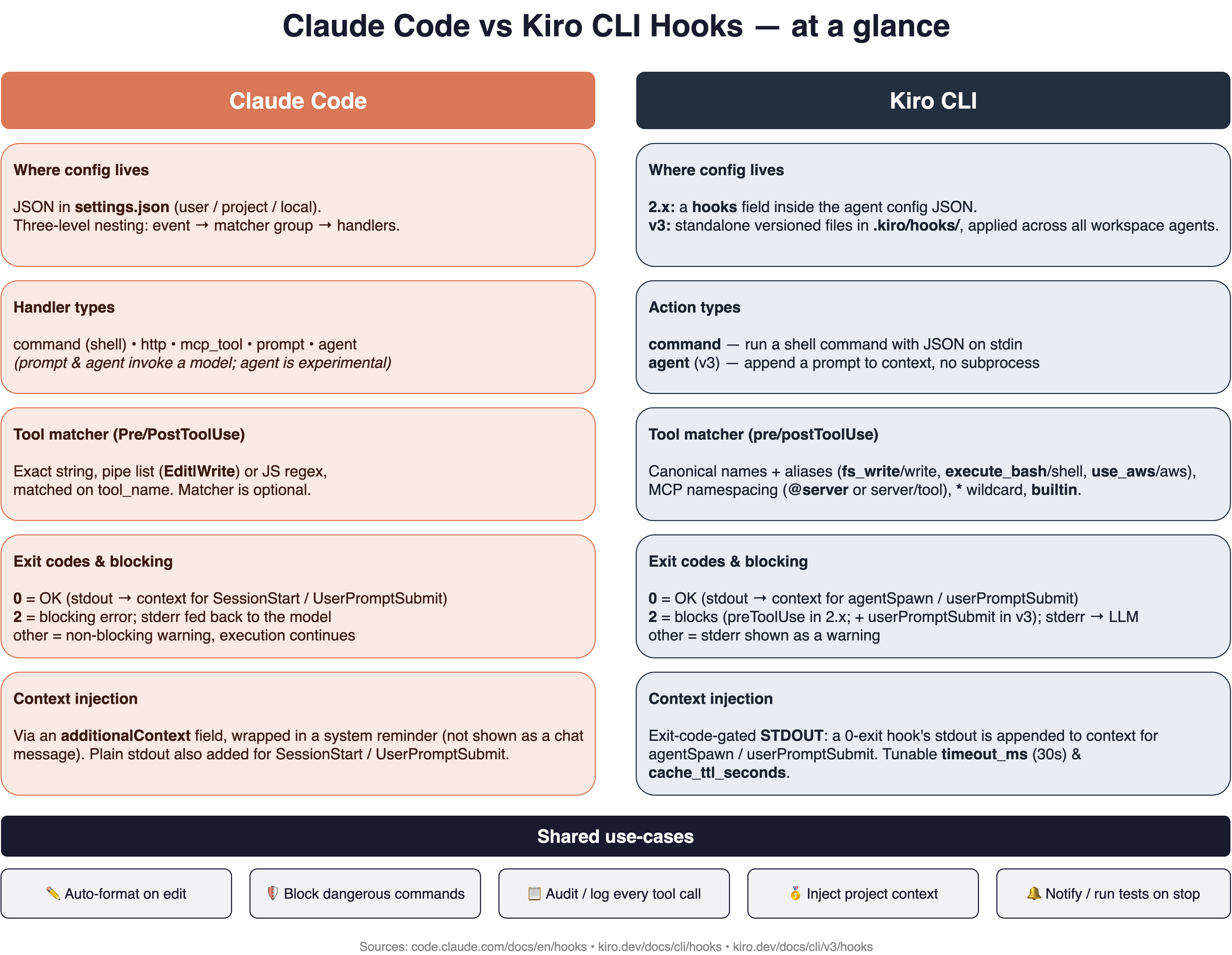 A full-feature comparison: config location, handler types, matchers, exit codes, and context injection.
The headline differences:
| Dimension | Claude Code | Kiro CLI |
|---|---|---|
| Config location | settings.json, three-level matcher nesting | 2.x: hooks field in agent JSON · v3: standalone files in .kiro/hooks/ |
| Handler / action types | command, http, mcp_tool, prompt, agent | command · agent (v3) |
| Tool matcher | exact / pipe-list / JS regex on tool_name | names + aliases, MCP @server, *, builtin |
| Context injection | named additionalContext field (system reminder) | exit-code-gated stdout |
| Extra knobs | async hooks, HTTP hooks | timeout_ms (30s), cache_ttl_seconds |
| Scope | user / project / local | 2.x: per-agent · v3: workspace-wide |
What’s striking is the convergence: same lifecycle moments, same stdin-JSON contract, same exit-code semantics (0 = ok / inject, 2 = block, other = warn). If you’ve written hooks for one, you can read hooks for the other almost immediately. The real divergence is structural — Claude Code’s richer handler menu (HTTP, MCP, subagent) versus Kiro CLI’s more expressive tool matcher and per-hook caching.
Security considerations
Hooks are powerful precisely because they run with your full user permissions — which is also exactly why they’re a security surface. Three things to internalise:
-
PreToolUseis the enforcement point. In Claude Code,PreToolUsehooks fire before any permission-mode check, so a hook can deny a tool even in bypass mode or with--dangerously-skip-permissions. Crucially, the relationship is asymmetric: a hook can tighten restrictions but cannot loosen them — returning “allow” never overrides a deny rule from settings (including enterprise-managed deny lists), which always take precedence. -
Hooks execute arbitrary code. A
commandhook is a shell command running on your machine. Treat asettings.jsonor.kiro/hooks/file from an untrusted repo with the same caution as aMakefileorpackage.jsonpostinstallscript — review before you run. -
Validate the stdin payload. Since the tool input arrives as JSON on stdin, a hook that naively interpolates
file_pathinto a shell command is a command-injection risk. Parse withjqand quote aggressively.
A practical rule: use
PreToolUsehooks as a deny-list backstop, not your only line of defence. Combine them with the agent’s built-in permission rules rather than relying on the hook alone.
Logs and observability
A fair question once you start wiring hooks into a real workflow: how do you see what they did? Neither tool ships an OpenTelemetry pipeline or a metrics dashboard for hooks — observability is achieved through a few built-in surfaces plus whatever logging your own scripts emit.
Claude Code gives you the most to work with:
- The debug log — run
claude --debugand a hook’s stdout is written to the debug log for every event (for most events stdout never reaches the transcript otherwise). Non-blocking errors show a<hook name> hook errornotice plus the first line of stderr in the transcript, with the full stderr in the debug log. - The
/hooksinspector — type/hooksin a session to open a read-only browser of every configured hook: its event, matcher, handler details, and crucially the source (User,Project,Local,Plugin,Session, orBuilt-in) so you can tell which settings file a hook came from. suppressOutputhides a hook’s stdout from the transcript but keeps it in the debug log — handy for noisy formatters.- A purpose-built audit event —
InstructionsLoadedruns asynchronously and cannot block; the docs explicitly recommend it for “audit logging, compliance tracking, or observability.” - HTTP hooks for centralised logging — point a hook at
http://localhost:8080/...and the event JSON is POSTed to your own collector, the closest thing to a telemetry pipe.
Kiro CLI is leaner: there’s no documented debug flag or log-file location. Observability comes from the stdin event JSON (session_id, tool_name, tool_input, tool_response) that your script can log wherever you like, governed by the same exit-code rules. The stop hook is especially useful here — it receives assistant_response, so you can inspect what the agent said without parsing a transcript.
The practical takeaway: the audit trail is something you build, most simply by having a tool-use hook append a JSON line to a log file on every call. That’s exactly what the demo project below does.
Practical use-cases
Putting it together, here are patterns that work in both agents. I’ve packaged the Claude Code versions of these into a runnable demo repo — claude-code-hooks-demo — so you can drop them into a project and watch them fire:
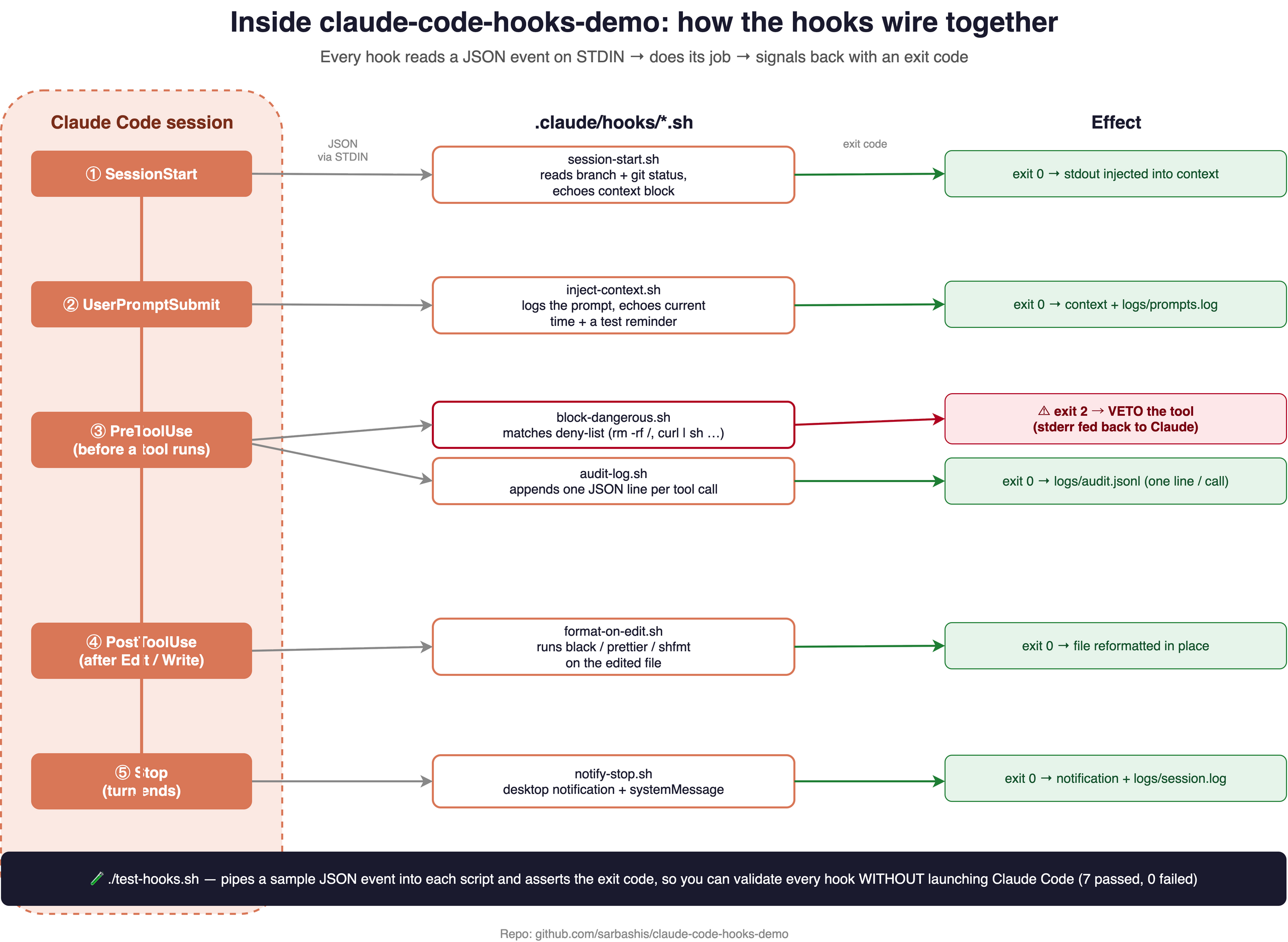 Inside the demo repo: each lifecycle event delivers a JSON payload on STDIN to a small shell script, which does its job and signals back with an exit code.
 block-dangerous.sh is the only one that returns exit 2 — vetoing the tool call. test-hooks.sh exercises all of them without launching Claude Code.
- Auto-format on edit —
PostToolUse/postToolUseon the write tool, runningprettier,cargo fmt,black, etc. - Block dangerous commands —
PreToolUse/preToolUseon the bash/shell tool, exit 2 if the command matches a forbidden pattern. - Inject project context at session start —
SessionStart/agentSpawnemitting git status, the current branch, open tickets, or coding standards. - Audit trail — any tool-use hook appending a JSON line to a log file for every action the agent takes.
- Notify or test on completion —
Stop/stoprunning the test suite or pinging Slack when the agent finishes a turn.
Closing thoughts
Hooks are what turn an AI coding agent from a clever autocomplete into a dependable part of your toolchain. They are the seam where probabilistic meets deterministic — the place you encode the rules that must hold regardless of what the model decides. The fact that Claude Code and Kiro CLI arrived at nearly the same design — same lifecycle, same stdin/exit-code contract — suggests this is becoming a de facto standard for agentic CLIs, not a vendor quirk.
Start small: a single PostToolUse formatter hook pays for itself immediately. Then graduate to PreToolUse guardrails once you trust the pattern.
A note on sourcing: every claim here is drawn from the vendors’ own documentation (Anthropic’s
code.claude.comand AWS’skiro.dev), cross-checked across multiple pages. These describe intended behaviour. Both products evolve quickly — Claude Code’sagenthandler is experimental, and Kiro CLI’s 2.x → v3 migration is ongoing — so verify against the live docs before relying on edge-case semantics.